 START YOUR 7 DAY FREE TRIAL
How to Add Products to TikTok Shop

TikTok Shop is rapidly becoming a significant player in the eCommerce world. As a seller, optimizing your presence on TikTok can unlock massive potential for growth. Whether you’re adding a few products or managing an entire catalog, understanding how to properly list and manage products in TikTok Shop is critical to maximizing visibility and driving sales.
In order to learn step-by-step instructions for adding products, tips for optimizing your listings, and strategies to boost performance we provide deailed guide to properly upload each product individual or in bulk.
How to Start Selling on TikTok Shop
In order to start adding products in Tiktok Shop the first requirements is you must have set up your TikTok Shop Seller Center account and get your business verified using available options. Once you complete TikTok Shop requirements, you’ll have access to a range of tools that will help you manage products and your store effectively.
Create a TikTok Shop Seller Account
Sign up for TikTok Shop: Download the TikTok Seller app or visit the TikTok Shop Seller Center website. Register by entering your business details, tax information, and proof of identity.
Verification: Once you’ve registered, TikTok will verify your account. Ensure your business meets TikTok’s eligibility requirements, including age restrictions, valid business documents, and a verifiable address.
Access the Seller Center Dashboard
Once your account is set up, log in to the Seller Center to manage products, view orders, and analyze performance. The dashboard is your central hub for all activities.
How to Add Products to TikTok Shop
Single Product Upload (Manual Process)
For new sellers or those with fewer items to manage, uploading single products individually can be the most straightforward approach.
Log in to your TikTok Shop Seller Center account and go to the Products section from the left-hand menu.
Open Manage Products to see your current catalog and product status (active, under review, rejected, or draft). This page is your main workspace for creating, editing, and monitoring all listings.
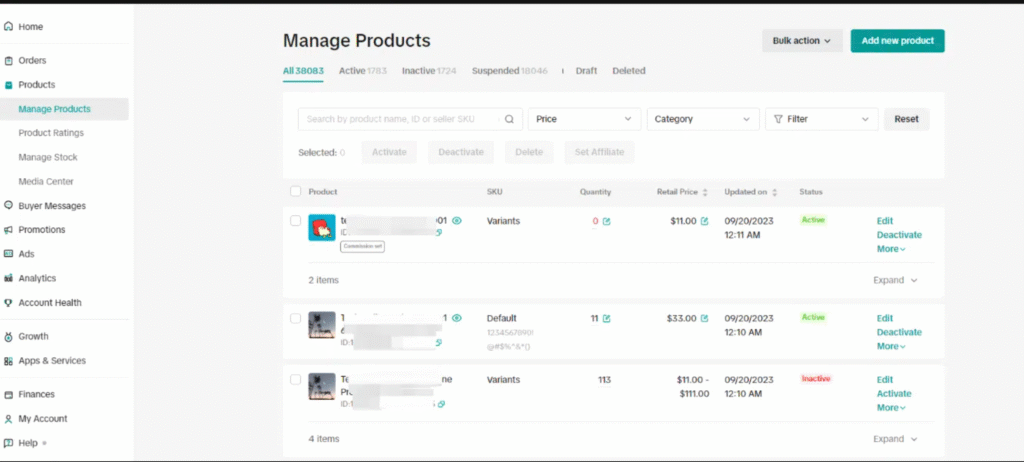
In the top-right corner, click Add Product (or Add New Product, depending on your region) to open the product creation page. Here you will create a new listing from scratch or use tools that help you speed up the process if you sell common or catalog products.
Add complete product details
TikTok will guide you through several sections to build a high-quality listing:
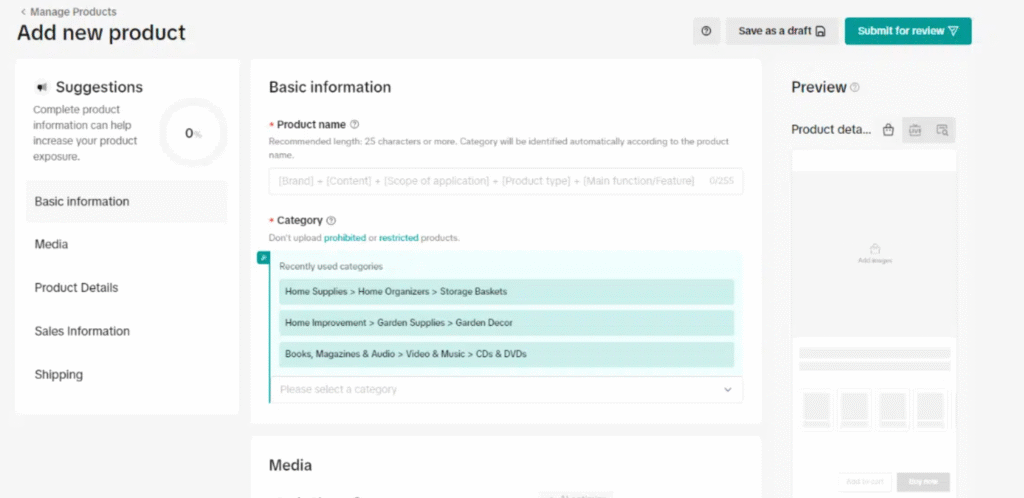
Category:
Select the most accurate category and subcategory for your product. This is important for search, recommendations, and approval, so avoid choosing a generic or unrelated category just to get listed.
Basic info (title, brand, attributes):
Enter a clear, descriptive product name that includes what the item is, the main feature, and key attributes (for example, “Wireless Bluetooth Earbuds with Noise Cancellation – Black”). Choose the correct brand, or “No Brand” if allowed, and fill in required attributes like size, color, material, or style where applicable.
Description:
Write an easy-to-understand description that covers what the product does, who it is for, key benefits, what’s included in the box, and any usage or care instructions. Use phrases people might search for, but keep the text natural and helpful.
Images and media:
Upload clear, high-resolution images that show the product from multiple angles, plus any important details (labels, textures, sizing). Make sure the main image has a clean background and accurately represents the product. If available, add a short video showing the product in use, unboxing, or a quick demo to increase engagement.
Sales information (price and stock):
Set your selling price in the correct currency and add any discounts or promotions if you plan to run them. Enter accurate stock levels so you don’t oversell. If you use SKUs internally, assign a unique SKU code to make tracking easier across channels.
Shipping and logistics:
Provide the correct weight and dimensions for each product or variant so shipping costs can be calculated correctly. Choose or confirm the shipping template you want to use (for example, standard shipping, free shipping, or region-specific rules). Double-check that your handling time and shipping regions match what you can actually fulfill.
Time-saving tip:
If TikTok offers a Quick Listing or product search tool in your market, you can search an existing catalog product and copy over basic information like title, category, and some attributes. Always review and customize this data (especially images, description, and price) to match your own product and branding.
Review and submit your product
Once all sections are filled in, take a moment to:
- Check that the title, images, and category match the product.
- Confirm there are no spelling errors or missing details in the description.
- Make sure price, stock, and shipping information are accurate and realistic.
- Verify that the product complies with TikTok Shop policies and is not in a prohibited category.
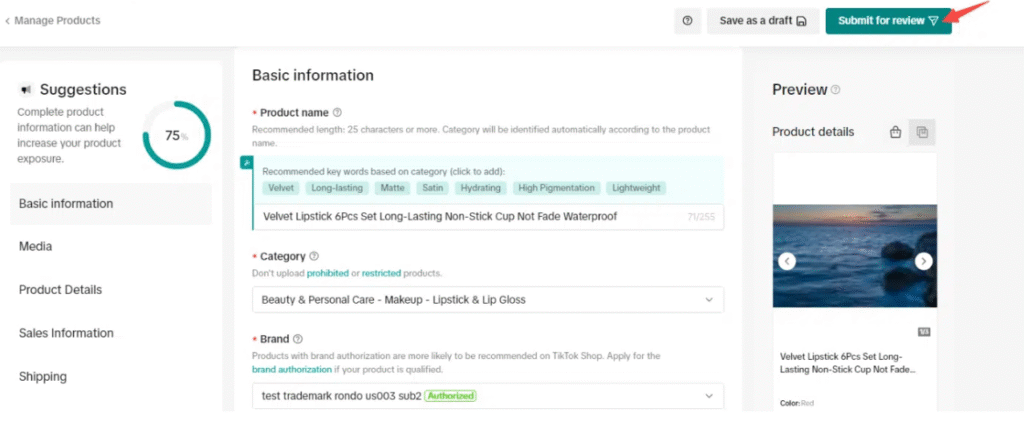
When everything looks correct, click Submit for review in the top-right corner. If you are not ready to publish or need more information, you can save the listing as a Draft and return to it later from the Manage Products page.
Upload Product Images
TikTok requires high-quality images (minimum 600×600 pixels). Upload up to nine images showcasing different angles and features. Ensure the first image has a clean, neutral background.
Optionally, add a product video to increase engagement and provide a better user experience.
Set Pricing and Inventory
- Pricing: Enter the product price in your local currency.
- Stock Quantity: Specify how many units are available for sale.
- SKU (optional): Add an internal SKU code for inventory tracking.
Shipping Details
Provide accurate weight and dimensions of the product for shipping calculations. Choose a shipping method (standard or free shipping) and configure the logistics accordingly.
Review and Submit for Approval
After filling in all the details, review the information for accuracy. Once satisfied, click “Submit” for TikTok to review and approve your listing. The approval process usually takes between a few hours to a couple of days.
Bulk Upload Products
If you have a large catalog or multiple variants of a product, TikTok provides the option to bulk upload products using a CSV or Excel template. This method is more efficient and can save a significant amount of time.
Access the Bulk Upload Section
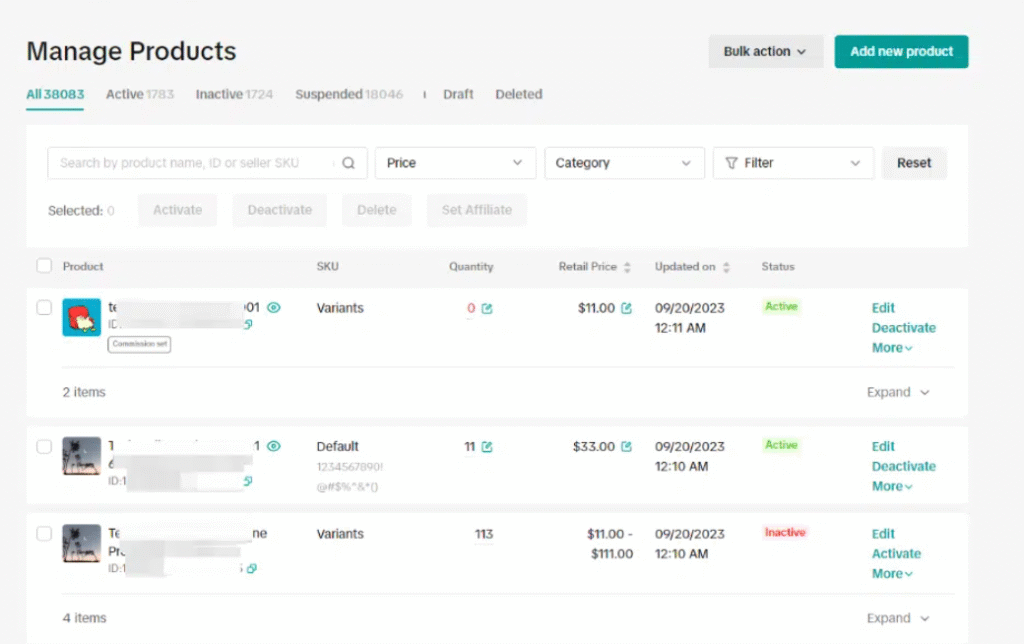
Go to the “Products” section in your Seller Center and click “Manage Products.”
Choose the “Bulk Action” option and select “Bulk Upload.”
Download the Bulk Upload Template
Choose the category that fits your products and download the corresponding template (CSV or Excel format). The template will require key fields like product name, category, description, price, stock quantity, SKU, and image URLs.
Fill Out the Template
For each product, fill out the required fields as per the template structure:
- Product Name: Use descriptive titles.
- Category and Sub-category: Be as specific as possible to improve searchability.
- Price and Stock: Enter accurate pricing and stock counts for each product.
- Weignt of product: Enter the specific weight of product.
Upload the Completed Template
Once the template is filled out, upload it through the Bulk Upload page.TikTok will process the data and check for errors. Initially TikTok only allow 50 products once your TikTok shop is credable it will be raise
Review and Submit
After the upload is complete, review the uploaded products. If there are any errors, fix them as suggested and re-upload the corrected file.
Advanced Uploading Products with Variations
If your product comes in multiple variations (e.g., color, size, or material), you can bulk upload these variations using an advanced template. This method ensures that all variants are grouped together under a parent product.
Download the Advanced Template
In the Bulk Upload section, select the “Advanced Mode” to upload products with variations. Download the advanced Excel template that supports parent and child SKUs.
Fill in Variation Details
- Parent SKU: This will be the same across all variations of a product.
- Variant Details: Define the variant name (e.g., size, color) and variant value (e.g., small, medium, red, blue).
- Additional Fields: Ensure each variant has a unique SKU, price, and stock quantity.
Upload and Review
Once the advanced template is filled out, upload it as you would with the bulk upload method. TikTok will validate the file for errors. If any issues arise, fix them and re-upload the corrected file.
Once your products are live on TikTok Shop and customers start buying, the real question becomes: how much are you actually making from each sale?
That’s where Kixmon TikTok Profit Tracker comes in. After you’ve added your products whether one by one or in a bulk, Kixmon automatically tracks all the costs that eat into your earnings: what you paid for the product, TikTok’s fees, shipping costs, any discounts you offered, and how much you spent on ads.
Instead of doing messy spreadsheet math or guessing your profits, you see exactly how much money you keep from every single sale. This means you can quickly spot which products are making you the most money and deserve more attention, and which ones are barely breaking even and need changes or should be dropped entirely.

Shopify Integration with TikTok Shop
If you’re using Shopify as your eCommerce platform, TikTok offers a seamless integration to sync your Shopify products with TikTok Shop. Here’s how to do it:
Step 1: Install the TikTok for Shopify App
Go to the Shopify Admin Dashboard and search for the TikTok app in the Shopify App Store.
Install the app and log in to your TikTok Shop account.
Step 2: Sync Products from Shopify to TikTok Shop
In the TikTok for Shopify app, navigate to the Product Sync section. Select the products you wish to add to TikTok Shop and ensure the details are correct (pricing, stock, and descriptions).
Click “Sync Products” to upload them to the TikTok Shop.
Step 3: Set Up Order and Payment Processing
Enable order syncing so that all TikTok Shop orders are automatically transferred to Shopify for processing. Ensure your payment settings are configured to handle transactions smoothly.
Optimizing Your Product Listings for Maximum Visibility
Creating a product listing is just the first step. To make sure your products stand out, follow these optimization tips:
Use High-Quality Visuals
High-resolution images and professional photos are essential for grabbing attention. Use clear, vibrant images and show your product from multiple angles. If possible, include a product video showcasing the product in use.
Write Engaging, Keyword-Rich Descriptions
Your product descriptions should be informative and focused on the benefits of the product. Use relevant keywords to make sure your listing appears in search results.
Leverage TikTok’s Shopping FeaturesTikTok offers various features like Live Shopping and Shoppable Videos that allow you to showcase your products in a dynamic, engaging format. Utilize these tools to increase engagement and drive sales.
Run TikTok Ads
Use TikTok Ads to reach a broader audience. Run targeted campaigns to drive traffic to your shop and increase visibility.
Collaborate with Influencers
Partnering with TikTok influencers can boost your product’s credibility and reach. Look for creators who align with your brand values and have a strong, engaged following.
Common Reasons Products Get Rejected
TikTok Shop has strict guidelines for product listings. Here are common reasons your products may get rejected and how to fix them:
Incomplete Product Details
Make sure all mandatory fields (title, description, price, stock quantity) are filled out completely.
Poor Image Quality
Use clear, high-quality images. Avoid watermarks, text, or distracting backgrounds.
Incorrect Categorization
Ensure that your products are listed under the correct category and subcategory.
Violating TikTok’s Policies
Review TikTok’s prohibited products list to ensure your items comply with the platform’s rules.
Intellectual Property Issues
Only list products you have the right to sell. Provide authorization or proof of ownership if required.
How to Re-sync Rejected Products
If your product is rejected, go to the Manage Products section, edit the necessary details, and resubmit for approval.
Conclusion
Learning how to add products to TikTok Shop is key to growing your online business. Whether you upload products one by one, in bulk, or through Shopify, following these steps will help you list products faster and start selling sooner. Using great photos, clear descriptions, and TikTok’s ads and influencer tools will help your shop stand out.
How long does TikTok Shop seller account approval take?
The standard approval time is typically one to three business days for sellers in established markets like the U.S. or UK. However, some applications may be processed within 24 to 48 hours if all documents are complete and accurate. International sellers or those with incomplete applications might wait five to seven days.
How much does TikTok Shop charge sellers?
TikTok Shop charges a commission fee that varies by product category, typically ranging from 5% to 9%. For example, Phones & Electronics have a 5% commission rate, while Fashion & Apparel has a 9% rate. Additionally, there is a transaction fee of approximately 2.18% to 3.78% per order. New sellers may receive reduced commission rates during their first 60-90 days.
What are the most common reasons products get rejected?
The most common rejection reasons include incomplete product details (missing title, description, price, or stock), poor image quality or non-compliant images, incorrect categorization, violating TikTok’s prohibited products policies, and intellectual property issues. Products may also be rejected for making unauthorized health claims or using copyrighted brand names without permission.
Can I sync my Shopify products with TikTok Shop?
Yes, TikTok offers an official integration app for Shopify. Install the TikTok app (TikTok Sales Channel or TikTok for Shopify) from the Shopify App Store, connect your TikTok Shop account, select products to sync, and enable order synchronization. Products and inventory will sync automatically between platforms.
What products are prohibited on TikTok Shop?
TikTok Shop has a strict prohibited products list that includes adult products, alcohol and tobacco, drugs and drug paraphernalia, weapons and ammunition, counterfeit goods, hazardous materials, gambling products, prescription medicines, and certain food products. Sexual wellness items, CBD products, weight loss supplements making specific claims, and homemade food products are also banned.

I’m Muhammad Ali, the founder of Kixmon LLC. I started Kixmon to make life easier for TikTok Shop sellers who struggle to track their real profits. With my experience in eCommerce and digital tools, I wanted to build a platform that clearly shows sellers how much they’re earning after all costs, fees, and commissions. My goal is simple: help sellers understand their numbers in real time so they can make smarter decisions and grow their business with confidence.