True Profit Tracker Built for Real Numbers
GMV is a vanity number. Profit is the only number that matters.
Most TikTok Shop sellers are scaling based on sales figures that don’t reflect reality. Platform fees, co-funded discounts, refunds, and affiliate commissions are buried across four different reports, and none of them tell you what actually hit your account until now.
With Kixmon, you’ll see exactly what you’re making and why.
Your GMV Is Not Your Profit
Here’s what happens every month: you check TikTok Seller Center, see your gross merchandise value, and assume that’s what you’re earning. Then the payout arrives. It’s always less. Always. The gap isn’t a mistake. It’s dozens of hidden deductions happening silently in the background.
Platform Fees
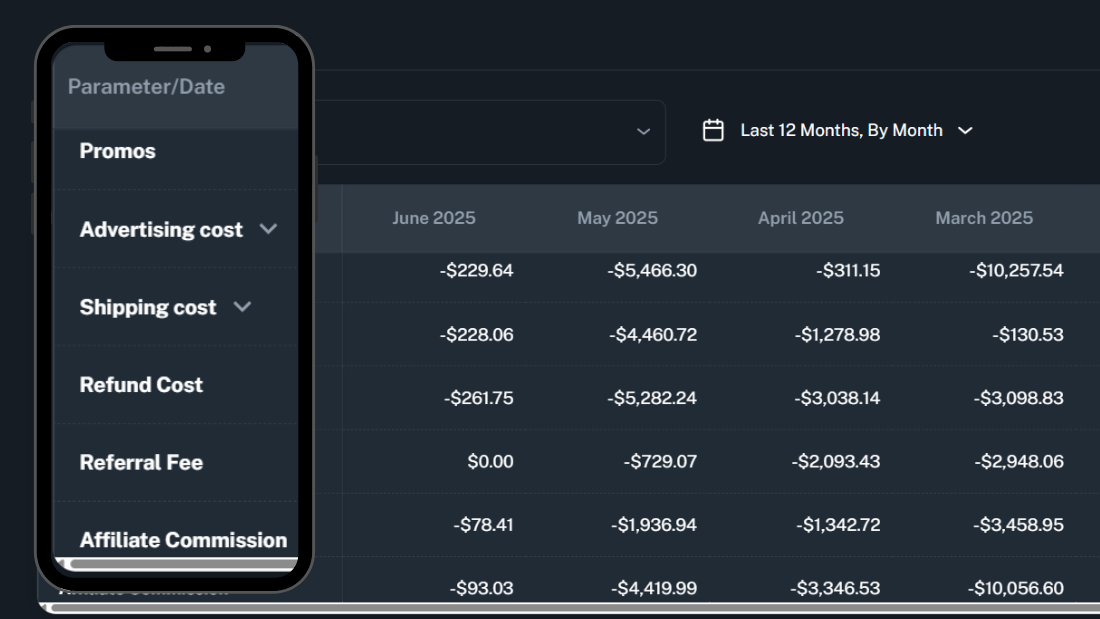
Platform referral fees eat 2–5% of every order. Co-funded discounts that TikTok pays for reduce your cut. FBT (Fulfillment by TikTok) fees bite another 5–10%. Refunds and cancellations reverse revenue without warning. Affiliate commissions to creators drain another layer. Ad spend from GMV Max campaigns comes straight from your payout. And that’s just the beginning.
Add Shipping, Packaging, and Ad Spend
What a Profit Tracker Should Actually Track
If you’re serious about knowing your real profit, here’s what your profit tracker needs to calculate, and most spreadsheets can’t handle it.
Start with gross revenue. That’s your total order value before anything else. Then subtract every deduction:
- Gross Revenue — Total order value
- Platform Referral Fees — TikTok’s cut per order
- FBT & Fulfillment Fees — If you use TikTok’s fulfillment
- Affiliate & Creator Commissions — Partner payouts + shop commissions
- Co-Funded Promotions — TikTok-subsidized discounts
- Refunds & Cancellations — Revenue reversals
- TikTok Ads Spend — GMV Max + regular ad campaigns
- COGS — Your product cost + last-mile shipping
Overhead & Operational Expenses — Team, tools, fulfillment costs
Spreadsheet formulas break every time TikTok changes its report format. A column shifts. A fee name changes. Suddenly, your entire model is broken, and you don’t know it. You’re recalculating by hand. You’re missing fees entirely. You’re flying blind again.
A real profit tracker needs to pull data directly from TikTok’s API. It needs to rec
HOW KIXMON TRACKS YOUR REAL PROFIT
Kixmon connects to your TikTok Shop, Ads Manager, and Affiliate Center using the official TikTok API. In under two minutes, you’ll have a complete profit picture.
Step 1 — Connect
Authorize Kixmon to access your TikTok Seller Center, Ads Manager, and Affiliate Center. No passwords. No manual uploads. No sketchy spreadsheet exports. Just official API authentication that takes 90 seconds.
Step 2 — Auto-Calculate
Kixmon pulls your data and reconciles 45+ hidden fees automatically. Platform fees, FBT charges, affiliate commissions, co-funded discounts, refunds, ad spend—all calculated instantly. Zero manual formulas. Zero room for error.
Step 3 — See Real Profit
A live dashboard shows your actual net profit. Filter by day, product, SKU, or traffic source. Watch your real numbers update in real time as orders come in.
No more hunting through four different reports. No more spreadsheet nightmares. Just one number that tells you the truth.
What Makes This Profit Tracker Different
Not every profit tracker is built the same way. Most miss hidden fees or don’t account for the complexity of TikTok Shop payouts. Here’s what sets this apart:
-
45+ Hidden Fee Auto-Tracking Catches every deduction TikTok makes—platform fees, FBT, co-funded discounts, affiliate commissions, refunds. Nothing gets missed.
-
Official TikTok API Connection Your data is verified, not scraped or estimated. You get the exact numbers TikTok uses for your payout.
-
Affiliate Commission Breakdown Partner commissions, shop commissions, and overall affiliate impact are auto-reconciled. No guessing how much creators cost you.
-
Expense Tracking Add salaries, creator fees, fulfillment platform costs, and agency fees. Get to true net profit, not just platform metrics.
WHY SPREADSHEETS FAIL AS A PROFIT TRACKER
Most TikTok Shop sellers start with a spreadsheet. It makes sense export a CSV from Seller Center, paste it into Excel, build a formula. But the moment TikTok changes its report structure (and it does, regularly), every formula breaks. You’re not tracking profit anymore. You’re chasing errors.
-
Too Many Reports Getting a profit number means exporting 4+ CSVs and manually stitching them together. Kixmon syncs everything via TikTok's official API
-
Missing Fees Spreadsheets only track what you manually enter. Co-funded discounts, FBT fees, and affiliate commissions silently kill your margin.
-
Hours of Reconciliation Most sellers spends hours a week on manual reconciliation. With Kixmon, your real profit is live the moment a sale happens.
What Our Clients Say
Find out why TikTok Shop sellers are leaving spreadsheets behind and choosing Kixmon to track daily net profits with ease, speed, and accuracy.
Kixmon Profit calculator saved me from launching a product at 12% margin. Adjusted pricing and now running at 38% its all done automatically.
Rated 5 Stars by TikTok Shop Sellers on Tiktok Shop App Store
TikTok Shop sellers are leaving spreadsheets behind and choosing Kixmon to track daily real net profits with ease, speed, accuracy, and excluding fees.
Is TikTok Shop profitable
Yes, TikTok Shop can be profitable, but it depends on how you track your expenses. Tools like Kixmon TikTok Shop Profit Tracker help ensure accurate profit tracking.
Plans & Pricing
Choose a pricing plan that works for you
Whether you're an individual, a small team, or a growing enterprise, we have a plan that aligns perfectly with your goals.
| Compare plans |
Start
$49/month
|
Pro
$99 /month
|
Elite
$199/month
|
|---|---|---|---|
| Orders per month | <1,500 | <15,000 | Unlimited |
| Data Retention after Signup | 3 Months | 12 Months | 12 Months |
| Real-time Profit Dashboard | ✔ | ✔ | ✔ |
| Real-time Stock Tracking | ✔ | ✔ | ✔ |
| Product-wise Profit | ✔ | ✔ | ✔ |
| Bulk Upload Feature for COGS and Shipping | ✔ | ✔ | ✔ |
| P&L Export to Excel | ✔ | ✔ | ✔ |
| Customer Support | ✔ | ✔ | ✔ |
| Select Start | Select Pro | Select Elite |
PNL Meaning: What Is P&L in Business, Finance & TikTok Shop?
PNL stands for Profit…

TikTok Ad Costs
TikTok advertising has grown…

Kalodata Alternatives
Kalodata offers a valuable…
Help Center
Got a question? Get your answer
Everything you need to know about the product and billing. Can’t find the answer you’re looking for? Please chat to our friendly team.
A profit tracker for TikTok Shop is a tool that connects to your official TikTok Seller Center via API and calculates your real net profit after all fees, ad spend, and commissions. Unlike TikTok's Seller Center which only shows GMV (gross merchandise value) a profit tracker accounts for platform referral fees, fulfillment costs, affiliate commissions, refunds, and other deductions so you see the actual money you're making.
Your sales figure (GMV) and your payout are two completely different numbers. TikTok deducts platform referral fees (2–5% per order), FBT fulfillment fees (5–10% if used), co-funded discount contributions, affiliate commissions to creators, refunds, and other costs before your payout is calculated. These deductions are spread across multiple reports, which is why most sellers can't trace where the gap came from.
Yes. Kixmon shows profit, fees, ad spend, and COGS broken down by individual product and SKU. This lets you identify which products are actually profitable and which ones are dragging down your margins. You can filter by product, variant, traffic source, or campaign to see exactly where your profit comes from.
TikTok Seller Center shows GMV and some high-level metrics, but it doesn't calculate real net profit. Kixmon aggregates data from three sources—Seller Center, Ads Manager, and Affiliate Center—and applies all deductions (fees, commissions, refunds, ad spend, COGS, expenses) to show you actual net profit. Seller Center is a reporting tool. Kixmon is a profit calculation tool.
Under 2 minutes. Connect your TikTok Shop via official API—authorize access to Seller Center, Ads Manager, and Affiliate Center, and Kixmon pulls your data instantly. No manual imports. No spreadsheets. No setup headaches. Your profit dashboard appears in real time.
Yes. TikTok Ads Manager spend and GMV Max campaigns are synced automatically. Ad spend is subtracted from revenue to calculate your real net profit by campaign and product. You'll see exactly how much each ad dollar costs you.
Yes. Kixmon is an official TikTok Shop certified partner. We use the verified TikTok API—the same data source TikTok uses internally for your payout calculations. This ensures accuracy and compliance.
Yes. 7 days free, no credit card required. You'll get full access to the real-time profit dashboard, all features, and historical data during the trial. After 7 days, upgrade to a paid plan or cancel anytime.